Modes
A mode determines when an amount is due within the period defined by a chosen frequency. With a mode set to In Advance, the amount becomes due at the start of the first period, and in any subsequent periods within a cash flow series. When set to In Arrears, the amount is due at the end of the first and subsequent periods.
Note
When set to In Advance, a single payment or charge is automatically assigned a One-off frequency, occurring as a single event without recurring periods. This aligns the cash flow with the contract start date or the end date of a prior series for improved readability. Explore this feature in examples 02, 05, and 11.
The Mode selection is only displayed when date input is disabled, a topic covered in Settings > Display > Date Input. When dates are in use, you have full control over when the first amount in a series falls due.
Modes with Multiple Rows
When performing calculations with more than one Payment or Charge, the mode you select in each row applies only to that row. To avoid unexpected results from mismatched modes, as described below, you should aim for consistency by using the same mode across all Payment or Charge rows.
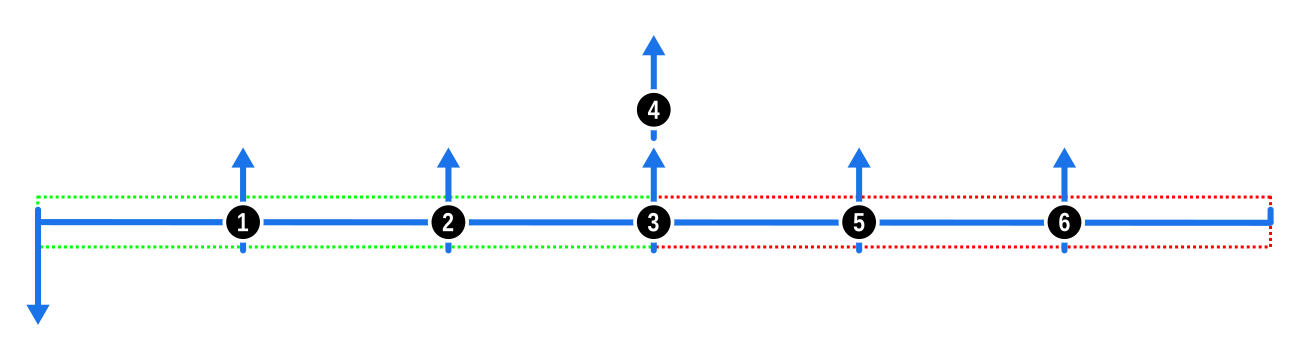
- The first diagram illustrates the consistent application of the In Advance mode across two payment series, resulting in equal spacing of cash flows. This spacing would be similar if both were set to In Arrears.

- The next diagram shows the effect when the first payment series is set to In Advance and the second to In Arrears. The mismatch results in a gap, the width of which is equal to the frequency of each series.

- Conversely, the following diagram depicts what happens when the first payment series is In Arrears and the second is In Advance. Here, the final payment in the first series coincides with the first payment of the second.
Keep these points in mind when selecting modes across multiple rows to ensure your calculations align with your expectations.